WebSocket & Broadcasting Settings
Configure real-time communication for bPass to enable live notifications, user presence indicators, and instant updates. Choose the broadcasting driver that best matches your infrastructure and performance requirements.
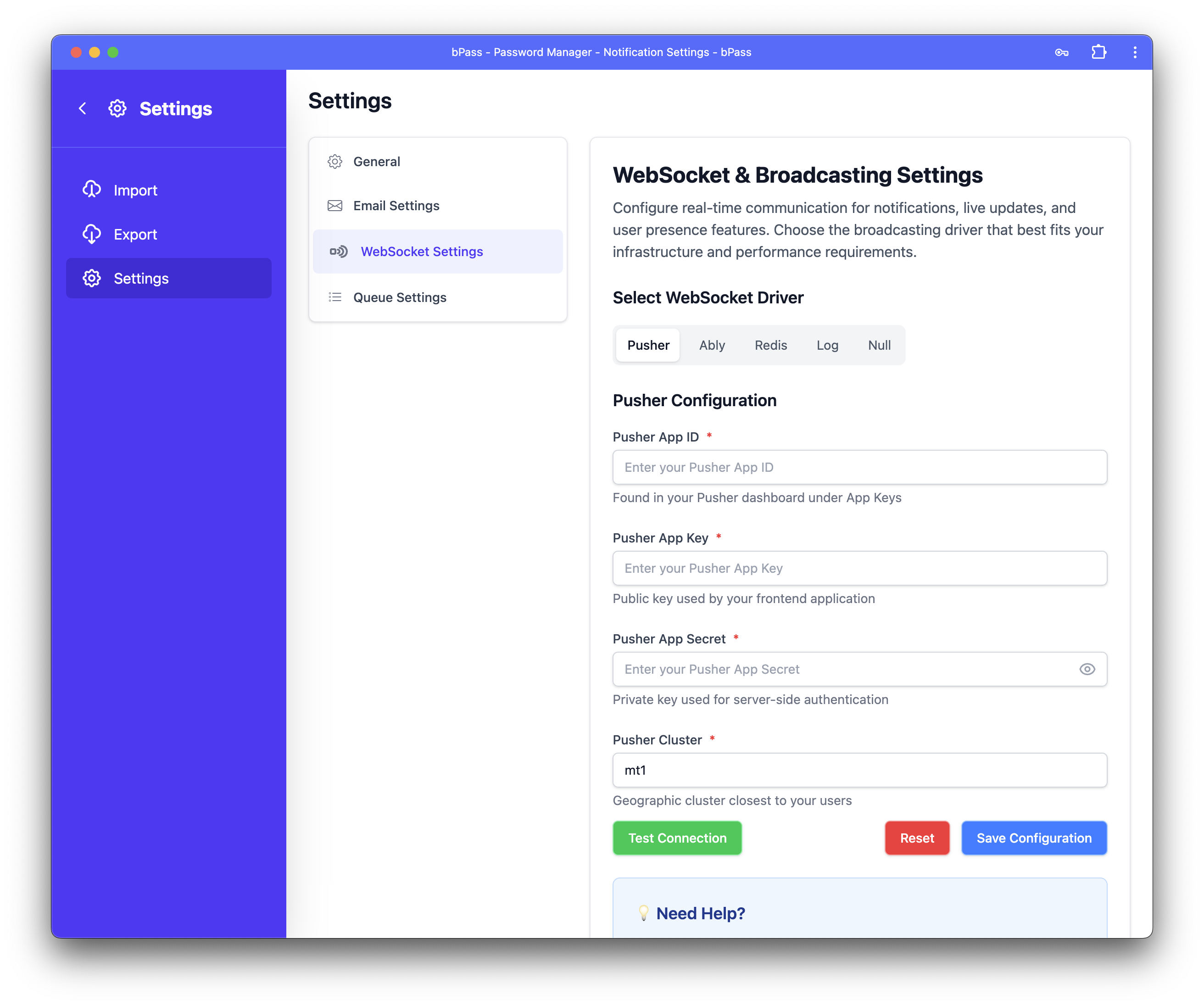
Overview
WebSocket and broadcasting functionality enables: - Live Notifications - Instant alerts for security events and system updates - User Presence - See when team members are online and active - Real-time Updates - Instant synchronization of password changes across devices - Collaborative Features - Live sharing and editing capabilities - System Status - Real-time monitoring and status updates
Broadcasting Driver Options
Pusher (Recommended for Most Users)
Hosted WebSocket service with global infrastructure for reliable real-time messaging.
Configuration Settings
- Pusher App ID - Found in your Pusher dashboard under App Keys
- Pusher App Key - Public key used by your frontend application
- Pusher App Secret - Private key used for server-side authentication
- Pusher Cluster - Geographic cluster closest to your users (e.g.,
us2,eu,ap2)
✅ Advantages
- Managed Service - 99.9% uptime with professional support
- Global CDN - Optimized delivery worldwide with presence channels
- Free Tier - 100,000 messages per day at no cost
- Easy Integration - Comprehensive documentation and SDKs
- Scalable - Automatically handles traffic spikes
❌ Disadvantages
- External Dependency - Relies on Pusher's service availability
- Cost Scaling - Expenses increase with higher message volumes
- Internet Requirement - Requires reliable internet connectivity
Setup Process
- Create Account - Sign up for a free account at pusher.com
- Create App - Set up a new application in the Pusher dashboard
- Get Credentials - Copy your App ID, Key, Secret, and Cluster from the dashboard
- Configure bPass - Enter the credentials in the form above
- Test Connection - Use the "Test Connection" button to verify setup
Popular Cluster Locations
- us2 - United States East Coast (Virginia)
- us3 - United States West Coast (Oregon)
- eu - Europe (Ireland)
- ap1 - Asia Pacific (Singapore)
- ap2 - Asia Pacific (Mumbai)
- ap3 - Asia Pacific (Tokyo)
- ap4 - Asia Pacific (Sydney)
Ably (Enterprise Grade)
Enterprise-grade realtime messaging platform with guaranteed message delivery and advanced features.
Configuration Settings
- Ably API Key - Found in your Ably dashboard under API Keys
✅ Advantages
- Enterprise Reliability - 99.999% uptime with SLA guarantees
- Message History - Automatic message persistence and replay
- Global Edge Network - Ultra-low latency worldwide
- Rich Features - Advanced presence, occupancy, and channel features
- Security - Enterprise-grade security and compliance
❌ Disadvantages
- Higher Cost - More expensive than basic alternatives
- Complex Pricing - Pricing structure can be complicated
- Feature Overkill - May be excessive for simple use cases
Setup Process
- Create Account - Sign up at ably.com
- Create API Key - Generate a new API key from your dashboard
- Set Permissions - Ensure the key has publish, subscribe, and presence capabilities
- Configure bPass - Enter the API key in the configuration
- Test Connection - Verify the connection works correctly
Redis (Self-Hosted High Performance)
Self-hosted Redis server for maximum performance and control over your real-time infrastructure.
Configuration Settings
- Redis Host - Server hostname or IP address (default:
127.0.0.1) - Redis Port - Server port number (default:
6379) - Redis Password - Authentication password (optional, leave empty if no auth)
- Redis Database - Database number for broadcasting (default:
0)
✅ Advantages
- Full Control - Complete ownership of your infrastructure
- High Performance - Maximum speed with minimal latency
- No External Costs - No recurring subscription fees
- Perfect for High Traffic - Scales excellently for busy applications
- Data Privacy - All data stays within your infrastructure
❌ Disadvantages
- Server Management - Requires Redis server setup and maintenance
- Scaling Complexity - Manual configuration needed for clustering
- Backup Responsibility - You manage data persistence and backups
Setup Requirements
Install Redis Server
# Ubuntu/Debian
sudo apt update
sudo apt install redis-server

# CentOS/RHEL
sudo yum install epel-release
sudo yum install redis

# macOS (using Homebrew)
brew install redis
Configure Redis for Broadcasting
Edit /etc/redis/redis.conf:
# Basic configuration
bind 127.0.0.1
port 6379
timeout 0
keepalive 300

# Memory management
maxmemory 256mb
maxmemory-policy allkeys-lru

# Persistence (optional but recommended)
save 900 1
save 300 10
save 60 10000

# Security (if needed)
# requirepass your-secure-password
Start Redis Service
# Ubuntu/Debian
sudo systemctl start redis-server
sudo systemctl enable redis-server

# CentOS/RHEL
sudo systemctl start redis
sudo systemctl enable redis

# macOS
brew services start redis
Verify Installation
Log (Development Mode)
Development mode that logs all broadcast events without actually sending them - perfect for testing.
✅ Advantages
- No Setup Required - Works immediately without configuration
- Perfect for Development - Test broadcast logic without side effects
- Debug Friendly - See all broadcast events in application logs
- No Performance Impact - Zero overhead on your application
❌ Disadvantages
- No Real-time Functionality - Events are logged but not delivered to users
- Development Only - Not suitable for production environments
- Limited Testing - Can't test actual user experience
⚠️ Development Mode Warning: - Real-time notifications will be logged but not delivered to users - User presence features will not work - Collaborative features will appear to work but won't sync between users - Check your application logs to see broadcast events
When to Use Log Mode
- Development Environment - Building and testing broadcast features
- CI/CD Pipelines - Automated testing without external dependencies
- Debugging - Troubleshooting broadcast logic and event flow
Null (Disabled)
Completely disables all WebSocket broadcasting functionality.
✅ Advantages
- No Resource Usage - Zero CPU and memory overhead
- Completely Disabled - No accidental broadcasts or connections
- Simple - No configuration needed
❌ Disadvantages
- No Real-time Features - All live functionality is unavailable
- Poor User Experience - Users miss important notifications
- Limited Functionality - Collaboration features won't work
⚠️ Broadcasting Disabled Warning:
- No live notifications or updates
- Users won't see presence indicators
- Chat and collaboration features unavailable
- Manual page refreshes required for updates
Configuration Process
Step 1: Select Broadcasting Driver
Use the driver selection slider to choose your preferred WebSocket system.
Step 2: Configure Connection Settings
Fill in the required configuration fields for your chosen driver.
Step 3: Test Connection (if applicable)
For drivers with configuration settings: 1. Click "Test Connection" to verify your setup 2. Monitor the connection status: - 🔵 Testing... - Connection test in progress - 🟢 Connection successful! - Configuration is correct - 🔴 Connection failed - Check settings and try again
Step 4: Save Configuration
Click "Save Configuration" to apply your WebSocket settings.
Performance Optimization
For High Traffic Applications
- Use Redis - Best performance for self-hosted solutions
- Enable Message Clustering - Distribute load across multiple Redis instances
- Optimize Channel Names - Use efficient naming conventions
- Implement Presence Throttling - Limit presence update frequency
Connection Management
- Connection Pooling - Reuse connections when possible
- Graceful Degradation - Handle connection failures elegantly
- Automatic Reconnection - Implement retry logic for dropped connections
- Heartbeat Monitoring - Monitor connection health
Monitoring and Troubleshooting
Connection Monitoring
Monitor your WebSocket connections:
For Pusher - Check Pusher dashboard for connection metrics - Monitor message volume and error rates - Review connection logs in Pusher console
For Redis
# Monitor Redis connections
redis-cli info clients

# Watch real-time commands
redis-cli monitor

# Check memory usage
redis-cli info memory
Common Issues
Connection Failures - Verify credentials are correct - Check firewall settings and network connectivity - Ensure external services are accessible - Review browser console for JavaScript errors
Messages Not Delivering - Confirm channel names match between backend and frontend - Check authentication and authorization settings - Verify event names are consistent - Monitor application logs for broadcast errors
Performance Issues - Monitor connection counts and message volume - Check for memory leaks in long-running connections - Optimize channel subscriptions and event handling - Consider connection pooling for high traffic
Getting Help
- Test Connections - Use built-in connection testing features
- Check Logs - Review both application and browser console logs
- Monitor Metrics - Watch connection and message statistics
- Provider Documentation - Consult your broadcasting provider's guides
Security Considerations
- API Key Security - Never expose secret keys in frontend code
- Channel Authorization - Implement proper channel access controls
- Rate Limiting - Limit message frequency to prevent abuse
- Input Validation - Validate all broadcast data before sending
- Secure Connections - Always use HTTPS/WSS in production
Recommendations by Environment
Production Environments
- Pusher - Reliable managed service with excellent documentation
- Ably - Enterprise features with guaranteed delivery
- Redis - Maximum performance for high-traffic applications
Development Environments
- Log - Safe testing without external dependencies
- Redis - Good for testing production-like behavior
- Pusher - Easy setup with generous free tier
High-Performance Applications
- Redis - Optimal performance for self-hosted solutions
- Ably - Enterprise reliability with global edge network
- Pusher - Good performance with managed infrastructure
Next Steps: After configuring WebSockets, ensure email delivery and queue processing are properly set up for a complete real-time communication system.